moudschegiebchn said: Things always seem to break when you at least need it. A broken graphic card while working on your Bachelorarbeit – the horror. D: I hope you can get your PC up and running again soon. :3
Eh, it works for now. But I still want a graphics card that can handle my high-quality snow…
meetmetotheriver said: Not just you. A quarter of my posts were flagged too, most of them completely innocent and only depicting normal TS2 gameplay. Good work, Tumblr. Idiots.
Ugh. How unnecessary. It’s not just that they completely overdid it to solve a problem they ignored for years- the software they’re using isn’t even working properly…
eulaliasims said: As far as I know, there’s no quick way to see all your posts that’ve been flagged. I would love to be proved wrong on this one, as I’m on page 35 of my blog now and still finding flagged posts. 😐
simper-fi said: I only had like 5 sensitive posts in the first half of my blog, but once I got to more recent things they’re popping up like mad
I assume they have doubled down on the newer posts because…? But I’m seeing a similar pattern in my posts. For some reason, it really hated my Pleasantview playthrough.
eulaliasims said: lmao that’s exactly why I’m requesting reviews on mine too. Like… I don’t know if the people actually doing the reviews have anything to do with the policy change (probably not?), but I kinda hope this points out how ridiculous it is.
thelonelysimsclub said: This is exactly why I’m reviewing mine too, because I’m petty.
*high five*
Although I’m not putting to much hope into this. Tumblr has proven itself to be… idiotic about such things.
Dies ist dein erster Beitrag. Klicke auf den Link „Bearbeiten“, um diesen zu bearbeiten oder zu löschen, oder beginne einen neuen Beitrag. Wenn du möchtest, kannst du deinen Lesern in diesem Beitrag mitteilen, warum du diesen Blog begonnen hast und was du damit vorhast. Wenn du Hilfe brauchst, frage die freundlichen Mitglieder der Support-Foren.
Currently going through as many of my 5000 posts as possible and requesting a review of all flagged as sensitive. Yes, I know that this will mean that they’ll all be out of order and at the front of my blog. But at this point, I kinda just want to piss whoever has to review this off.
(Also, how come other people have like 4 “sensitive” posts and I’m only 6 months in and already at around 50?)
If you want to back up your entire blog without resorting to Tumblr’s default backup (which has never worked for me), try this out. It saves all of your pictures, tags, and other miscellanea into a nice little folder wherever you happen to install it.
Highly recommend this if you want a back up. (Caveat: it’s only for Windows.) It’s much, much faster than using tumblr’s backup thing.
Oh awesome, I’ll give this a try because my backup seems to be stuck.
Since I already own a dreamwidth account (always wanted to “transfer” the few downloads I have there), I may as well share it:
Okay, folks. So. Tumblr’s jumped the shark in a big way, and I’m not even just talking about indiscriminately blocking all “adult” content on a platform that IS, in fact, primarily 18+.
Many blogs, like the wonderful @blackkatmagic , that are not especially NSFW have vanished.
(And I for one LIKE being able to go to curated porn blogs run by actual people and have a chance of finding stuff to my taste, it was one of the things that kept me on this hellsite, but that’s another issue entirely.)
I know lots of people are talking about migrating, but none of us are sure to where yet. Pillowfort seems to be an option, some people are talking about Twitter. But for now, it’s a mess, and even if we knew where we were going, it’s often a huge process, and a lot of us have stuff on tumblr that ONLY exists there.
One possible quick solution to save your blogs, both NSFW and personal, is to import it to WordPress. I found this solution through from frantic googling on how to save an entire blog, text posts an all. There are several apps for downloading all the pictures from a tumblr, (Plently for Windows, but only a few paid ones for mac, of which Tumbelog Picture Downloader is working for me so far) but this is the only solution I’ve seen so far that allows you to save EVERYTHING. I downloaded my NSFW blog in like 10 min. My regular blog, which is significantly larger, is in the process of importing, but I don’t anticipate any problems. I will, of course, update you if I have any.
This tutorial I found worked really easily. http://quickguide (.) tumblr (.) com/post/39780378703/backing-up-your-tumblr-blog-to-wordpress
I put parenthesis around the .’s like we’re back in FF-Hell, just in case tumblr’s new thing about outgoing links kicks in. You know what to do.
To break it down, just in case:
Sign up for a WordPress.com account at wordpress (.) com/start
You’ll have to create an account, with your email, a username, and a password. They should send you a confirmation email immediately, check it, activate it, and you’re good to go.
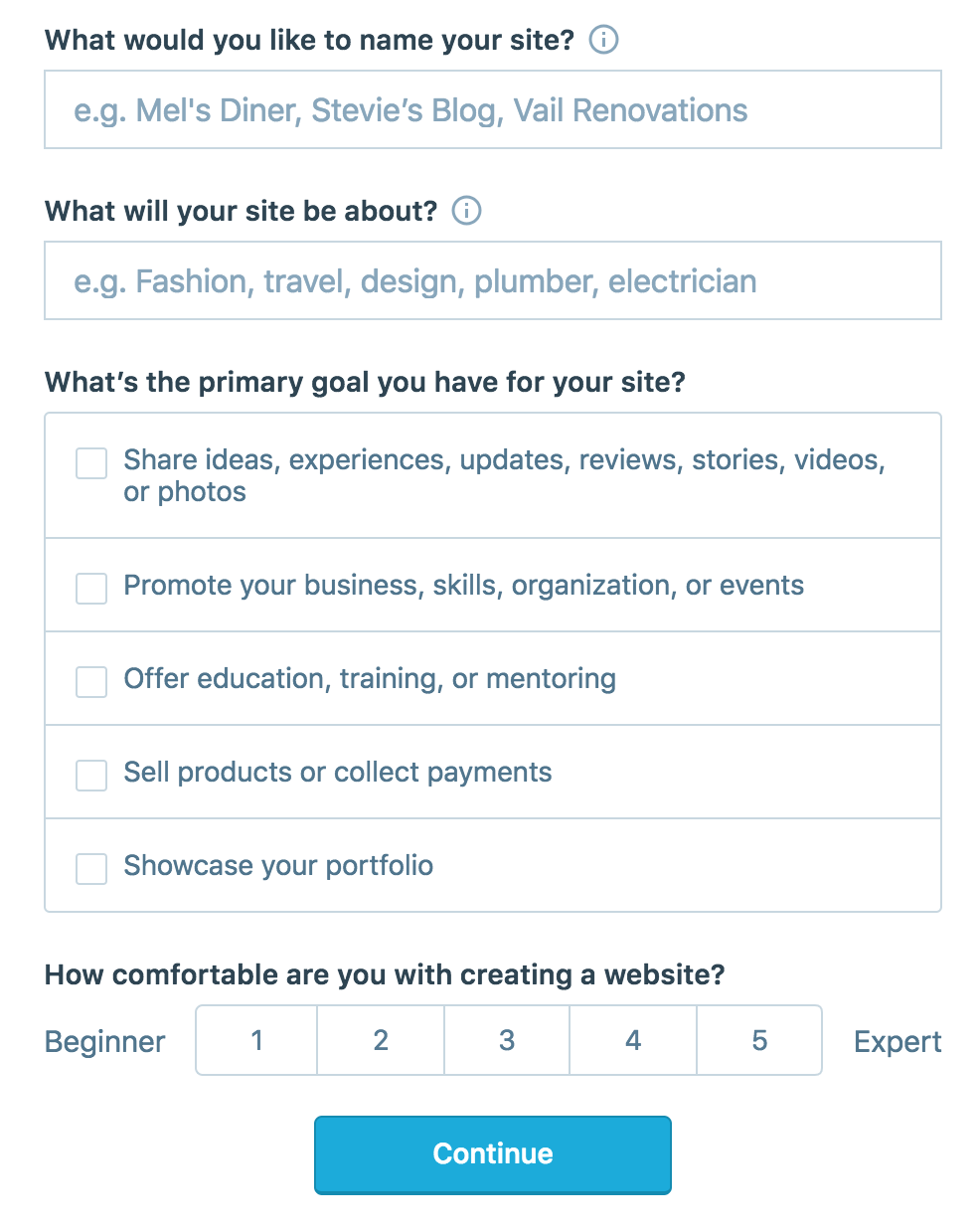
On the site, it will ask you for a site name. That page asks you a bunch of other information too, but you only have to fill out the site name.
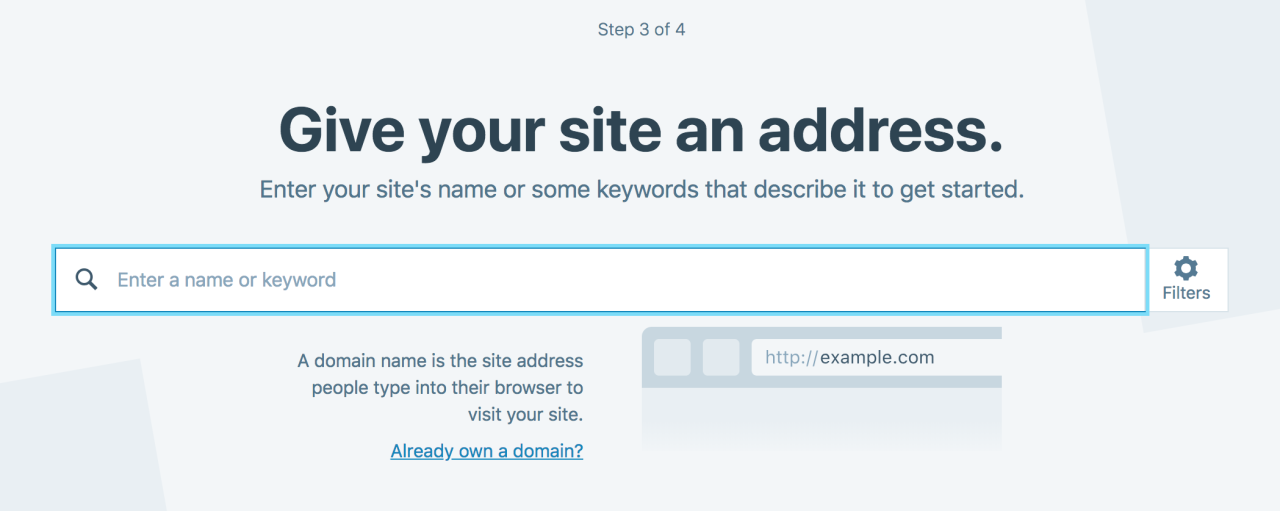
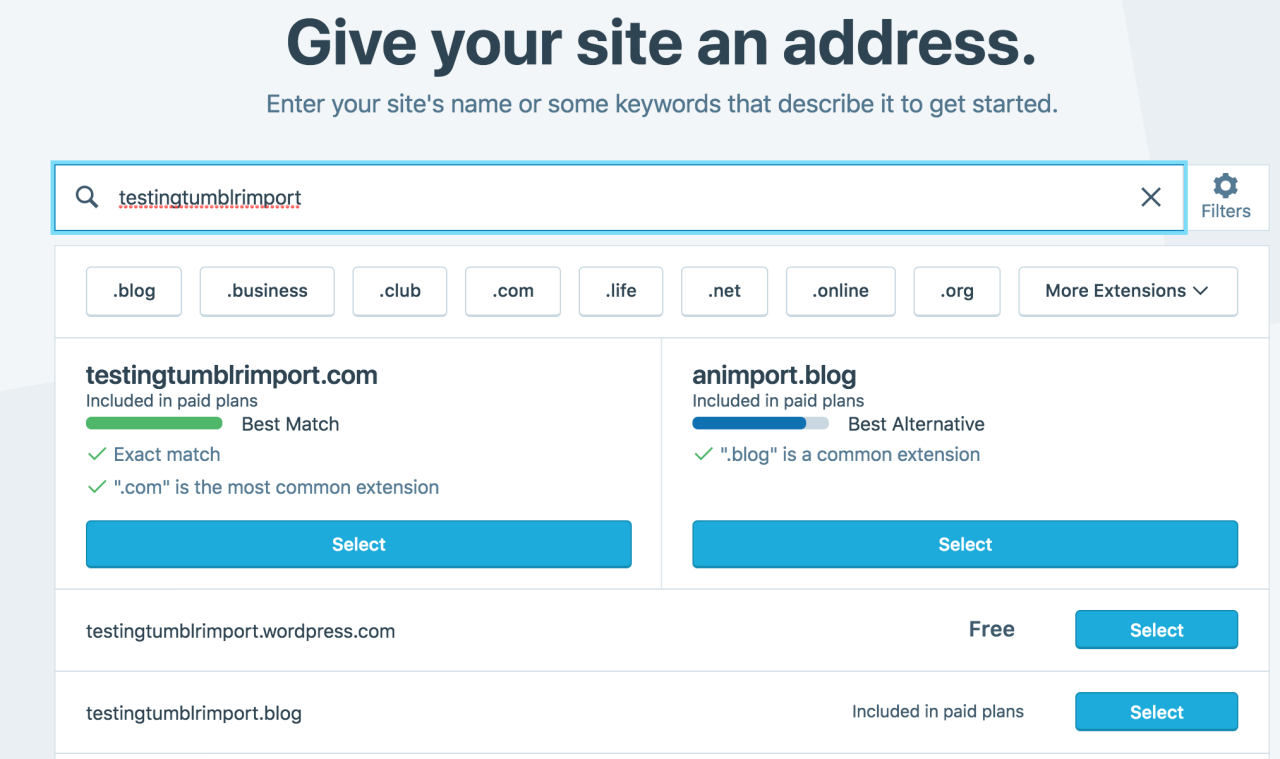
Then you have to give your site a URL. If you’re lucky, your tumblr URL is still available, if not you’ll have to come up with another one, sorry.
It will tell you if that option is still available for free.
Then it will ask you to pick a plan. Free is really good enough, I swear.
Now you’re set up! You can import your tumblr!
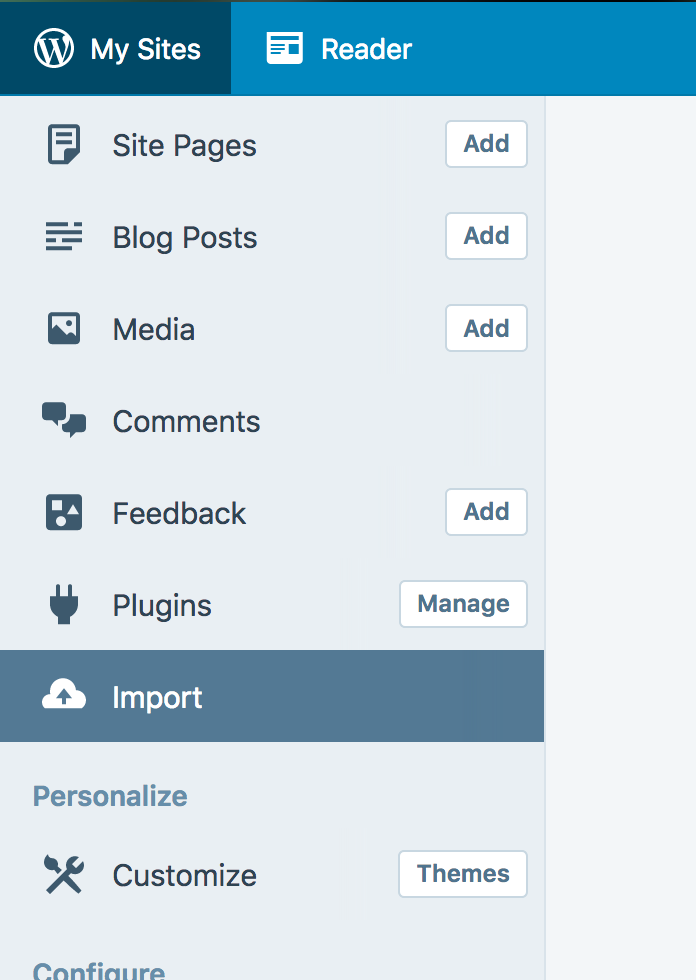
The only differences from the linked tutorial are that the Import button is now on the first level menu, not in tools.
Hit Import, then you have to follow the link for “other importers” at the bottom, to find the option for Tumblr.
Then you’ll have to sign in with tumblr, using your normal tumblr credentials. You’ll be redirected there automatically.
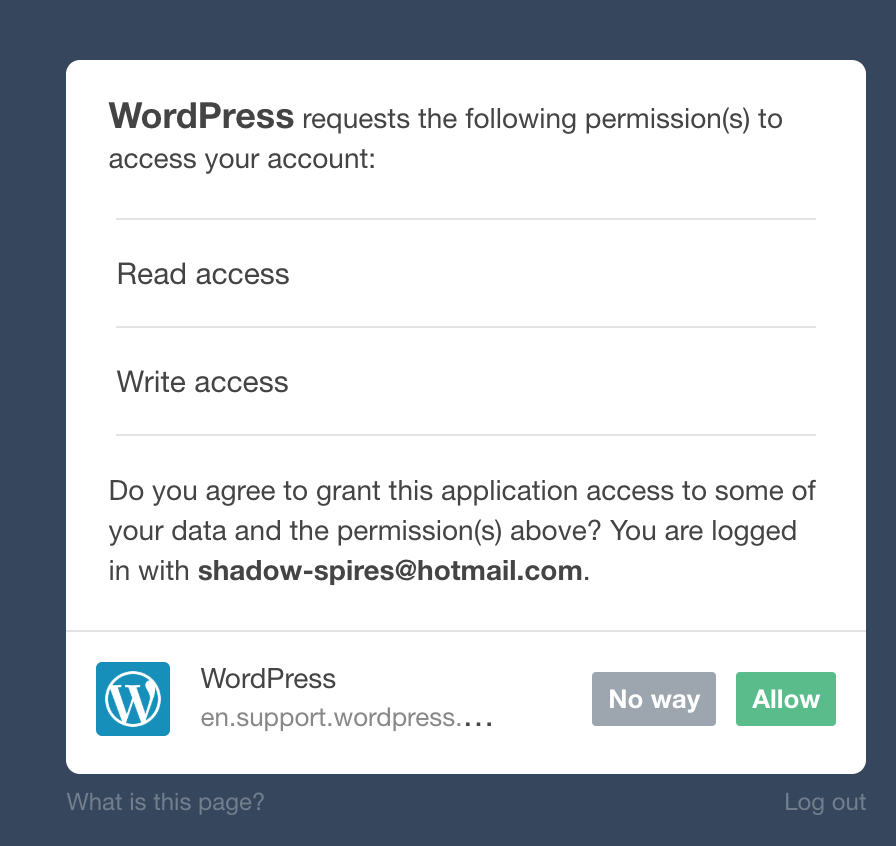
You’ll have to allow WordPress permissions on your blog.
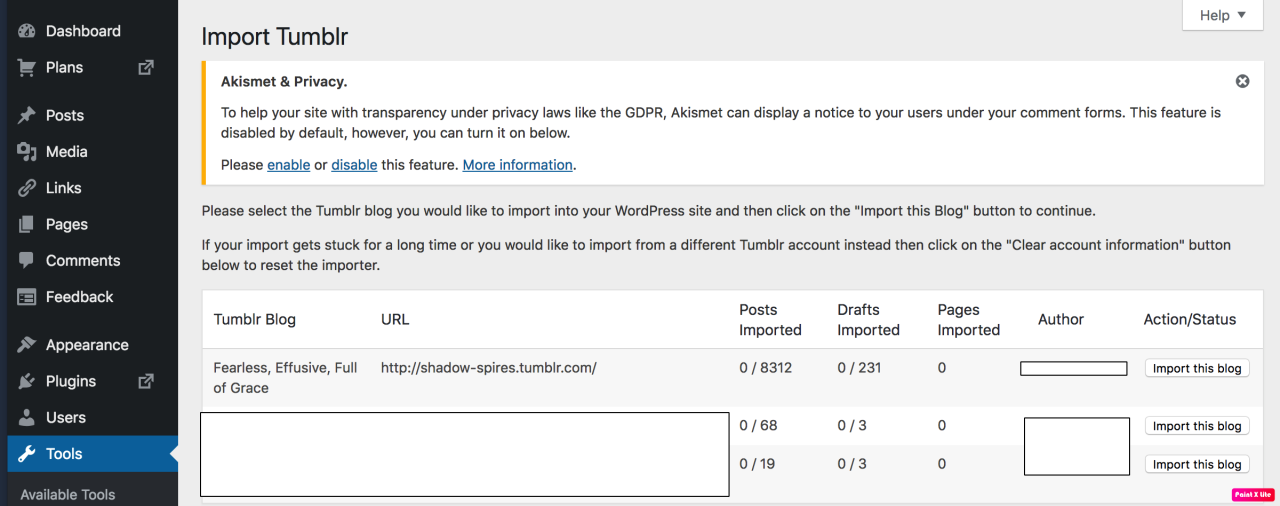
Then your blogs, including all your sideblogs, will show up in wordpress.
Hit import, wait a WHILE depending on the size of your blog, and you’re done!
ALSO!!
I made my NSFW blog private for now, since I don’t know WP’s policy on NSFW.
This means that to access it, someone has to have an account and request access. But hey, part of our problem on this hellsite has been people going places they aren’t wanted, so I don’t personally see this as a bad thing. They can send a request from the landing site on your blog, you get an email, click a link in the email, and PRESTO, they have access.
To make it private, go to Settings > Reading > Site Visibility. Go back and check, it took me changing the setting twice for it to actually stick.
tl;dr, you can import your entire blog to wordpress in just a few steps.
I’m going to tag the hell out of this, in no particular order. PLEASE reblog this and spread the word so people know it’s an option. If you’re having trouble, PM me, and I’m happy to help.
There are a whole bunch more, but that’s a start. Please reblog the hell out of this, so people are aware of this one simple option.
For people asking how to backup thier blog
On an unrelated note, provided that tumblr staff doesn’t take this site into the backyard and shoot it before Christmas, I think I might attempt to do something with the Veronaville Sims and the A Christmas Carol story for Christmas this year.
Unless those posts get flagged as well (Sexy! Ghost of Christmas Past Puck Summerdream: The Horror!)
Yo, @staff . Your weird content filter doesn’t work. Please stop censoring fully clothed Sims playing chess.
(Well, this has been fun… like 1/5 of my posts from the last three months were flagged as sensitive.)
(Is there any way to see all posts that were flagged? Because I’m not going to sift through almost 5,000 posts…)





 aondaneedles